

6 Ways to Design Your Own PCB Online: The 2026 Industry Guide
The days of needing a ten-thousand-dollar enterprise software license just to spin a rapid prototype board are permanently over. If you want to design your own PCB online today, the browser-based Electronic Design Automation (EDA) market has matured into a highly viable, commercially sound pipeline. However, navigating the myriad of cloud-based tools requires strict technical scrutiny. As an experienced electronics manufacturing provider, we routinely receive Gerber files exported from web-based editors. Some are flawless; others are unmanufacturable disasters riddled with design rule violations.
From our experience engineering and assembling high-mix, complex printed circuit boards, we know that the tool you choose dictates the speed of your product's time-to-market. The ability to design your own PCB online offers unparalleled collaboration, instant component sourcing updates, and platform independence. But is it robust enough for heavy-duty commercial applications? In this definitive guide, we will break down the top 6 ways to design your own PCB online, separate the toys from the professional instruments, and provide the exact framework you need to successfully transition your digital design into a physical, mass-produced product.
Quick Answer: How to Design Your Own PCB Online
To design your own PCB online, you utilize cloud-based Electronic Design Automation (EDA) platforms that run directly in your web browser. The 6 best ways/tools to do this in 2026 are: 1. EasyEDA (Best for rapid, integrated prototyping), 2. Flux.ai (Best for AI-assisted collaboration), 3. Upverter (Best for professional engineering teams), 4. CircuitMaker (Best for community-driven open-source projects), 5. Aisler Studio (Best for instant direct-to-manufacture workflows), and 6. Fusion 360 Web (Best for electro-mechanical integration). In most professional situations, we recommend EasyEDA or Upverter for hardware startups due to their robust Design Rule Checks (DRC) and seamless export capabilities. Once your design is complete, you must export standard Gerber or ODB++ files to partner with elite electronic manufacturing services companies for physical assembly.
Table of Contents
- What It Is: Cloud-Based PCB Design
- How It Works: From Browser to Gerber
- The 6 Best Ways to Design Your Own PCB Online
- Commercial Benefits of Online EDA
- Limitations and Harsh Realities
- Who Should Use Online Tools
- Who Does Not Need Them
- Common Mistakes in Cloud PCB Design
- Selection and Buying Considerations
- Expert Recommendation by Wintech
- Essential Comparison and Decision Tables
- The Bottom Line
- Frequently Asked Questions
What It Is: Cloud-Based PCB Design
To design your own PCB online means utilizing a web browser as your primary interface for schematic capture and printed circuit board layout. Traditionally, this required heavy desktop monolithic software like Altium Designer, Mentor Graphics, or KiCad. Cloud-based EDA platforms offload the computational heavy lifting—such as 3D rendering and autorouting algorithms—to remote servers. This ensures that you can design complex electronic systems on a standard laptop, a Mac, or even a tablet, provided you have a stable internet connection. These platforms securely store your intellectual property (IP), manage version control natively, and integrate live component pricing and availability directly into your Bill of Materials (BOM).
How It Works: From Browser to Gerber
The workflow to design your own PCB online follows a strict engineering sequence. First, you utilize the platform's Schematic Editor to draw the logical connections between electronic components, pulling symbols from a cloud-synchronized library. Next, you transition to the PCB Layout Editor, where those logical connections become physical copper traces on a virtual fiberglass board. You define board outlines, layer stacks (e.g., 2-layer, 4-layer, or 6-layer), and place component footprints.
The critical step is running the Design Rule Check (DRC) to ensure your traces are not too close together and your vias are properly sized. Finally, the online tool compiles your design into universally accepted manufacturing files—typically Gerber RS-274X, NC Drill files, and a Pick-and-Place (CPL) file. These are the exact files you transmit to premier pcb board makers China to initiate bare board fabrication and surface mount assembly.
The 6 Best Ways to Design Your Own PCB Online
In our testing, not all web-based CAD tools survive the transition from hobbyist sandbox to commercial application. Here are the 6 strictly vetted platforms we endorse for 2026:
1. EasyEDA
EasyEDA is currently the dominant force in browser-based design. Its massive advantage is the direct integration with major Asian component distributors (like LCSC). When you place a resistor in EasyEDA, you instantly know its stock level and price. It handles multi-layer boards effortlessly and is our top recommendation for hardware startups looking to move fast.
2. Flux.ai
Flux is revolutionizing how teams design your own PCB online by integrating an AI hardware copilot. The platform behaves much like Google Docs for hardware, allowing multiple engineers to route traces simultaneously in real-time. The AI can automatically suggest component alternatives when supply chain shortages hit, which is a massive commercial advantage.
3. Upverter (by Altium)
Acquired by Altium, Upverter brings enterprise-grade routing capabilities to the browser. It features one of the most robust, error-free component libraries on the web. For commercial users transitioning away from desktop software, Upverter offers the steepest, yet most rewarding, professional learning curve.
4. CircuitMaker (Web Integrations)
Also under the Altium umbrella, CircuitMaker operates on a community-driven model. While it utilizes a lightweight local client, its cloud-native architecture relies heavily on online part repositories and community sharing. It is exceptionally powerful but forces users to make their designs public, which limits its use for proprietary commercial IP.
5. Aisler Studio
Aisler approaches cloud design differently. It is less of a traditional layout editor and more of an immediate direct-to-manufacture bridging tool. You can upload basic netlists or use their web environment to finalize layouts with a guarantee that the board is 100% manufacturable by their European partner fabs.
6. Autodesk Fusion 360 (Electronics Workspace)
Fusion 360 has migrated significant portions of EAGLE CAD into its cloud-connected ecosystem. If your product requires tight electro-mechanical integration—meaning your PCB must perfectly fit inside a complex 3D-printed enclosure—this platform allows you to design your own PCB online while simultaneously manipulating the mechanical housing.
Commercial Benefits of Online EDA
The primary benefit is aggressive supply chain visibility. Desktop CAD tools often design hardware in a vacuum, leading to the dreaded scenario where a completed board uses components that went out of stock months ago. When you design your own PCB online, component libraries are tied to live distributor APIs. Furthermore, the elimination of software installation, IT maintenance, and expensive per-seat licensing drastically lowers the barrier to entry for agile engineering teams looking to partner with low cost PCB manufacturers.
Limitations and Harsh Realities
We must use practical judgment here: cloud EDA is not invincible. The most severe limitation is browser memory constraints. If you are attempting to route a high-density interconnect (HDI), 12-layer motherboard with DDR5 memory routing and thousands of components, browser-based tools will lag, freeze, and crash. Browsers simply cannot handle the localized computational load that a dedicated desktop GPU can. Additionally, if your facility loses internet access, your engineering department grinds to an absolute halt.
Who Should Use Online Tools
For beginners, hardware startups, and IoT developers: If you are designing 2-layer to 6-layer boards for consumer electronics, smart home devices, or basic industrial sensors, online EDA tools are more than sufficient. They offer the fastest path from conceptual schematic to a tangible prototype in your hands.
Who Does Not Need Them
For heavy-duty applications: Aerospace, defense, and high-frequency RF microwave designers must avoid browser-based tools. These industries require deep signal integrity simulation, rigid IP security (air-gapped networks), and extreme layer counts that only desktop monoliths like Altium Designer or Mentor Xpedition can securely and effectively process.
Common Mistakes in Cloud PCB Design
In most professional situations, the biggest mistake we see is blind reliance on the tool's Autorouter. Browser-based autorouters are notoriously inefficient; they create unnecessary vias, ignore critical return current paths, and destroy signal integrity. Always route your critical traces manually. Another common error is failing to synchronize the platform's Design Rules with your manufacturer's capabilities. If you design traces with a 3-mil clearance, but your chosen fab house only supports 5-mil, your board will be rejected at the tooling stage.
Selection and Buying Considerations
When selecting a platform to design your own PCB online, evaluate the export restrictions. Some "free" online tools lock your design inside their ecosystem, forcing you to use their specific manufacturing partners at inflated prices. You must ensure the platform allows unrestricted, free exports of standard Gerber RS-274X, NC Drill, and Pick-and-Place files. You must own your data so you can shop your design around to the best electronic manufacturing companies.
Expert Recommendation by Wintech
Wintech: Your Global Manufacturing Partner
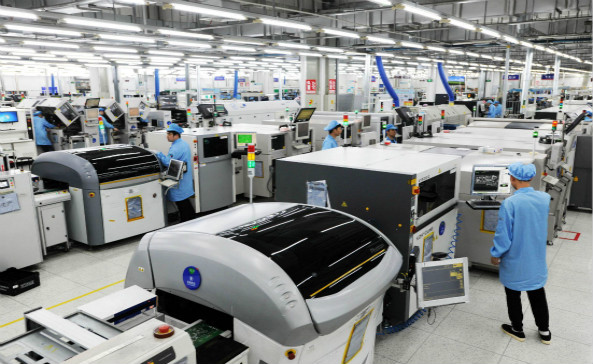
At Wintech, we operate as a full turnkey service, high-mix, low to mid volume electronics manufacturing and custom material solutions provider. We possess a proven track record of supplying state-of-the-art solutions to a global customer base. We provide tailor-made solutions for our customers: high level, high difficulty, large size, complex structure, high precision PCB Layout, PCBAs, and turnkey complete products.
Whether you utilize EasyEDA, Upverter, or Flux to design your own PCB online, transitioning that digital file into a physical, flawless product requires elite manufacturing execution. We recommend utilizing cloud tools for your rapid prototyping and collaborative design phases. Once your Gerbers and BOMs are finalized, partner with Wintech for your prototyping, low to mid volume, and mass production needs. Many of the world's top 500 enterprises have cooperated with us for many years. To understand our full capabilities, review the Wintech PCB company profile. Wintech is worth relying on.
Essential Comparison and Decision Tables
| Platform | Best Suited For | Key Commercial Advantage |
|---|---|---|
| EasyEDA | Rapid Prototyping & Startups | Direct API link to Asian component distributors. |
| Flux.ai | Remote Collaborative Teams | AI-assisted component replacement and live multiplayer editing. |
| Upverter | Professional Engineering | Enterprise-grade component library and robust rule checking. |
| Fusion 360 Web | Electro-Mechanical Products | Seamless 3D mechanical enclosure integration. |
| Feature | Cloud-Based EDA (Online) | Desktop EDA (e.g., Altium, KiCad) |
|---|---|---|
| Setup & Accessibility | Instant. Runs on any browser/OS. | Heavy installation. Usually Windows only. |
| Collaboration | Native real-time "Google Docs" style editing. | Requires complex server setup (Vault/365). |
| Performance Limit | Lags on highly complex, dense 8+ layer boards. | Leverages local GPU. Can handle massive complexity. |
| Component Sourcing | Live API pricing and stock integration. | Often requires manual library management. |
| Pros (Advantages) | Cons (Limitations) |
|---|---|
| Zero IT overhead or costly software license maintenance. | Total reliance on a stable, high-speed internet connection. |
| Automatic cloud backups prevent catastrophic data loss. | Potential IP security concerns for highly classified defense projects. |
| Significantly accelerates time-to-market for early-stage prototypes. | Browser memory constraints limit high-frequency RF routing capability. |
| Manufacturing Step | What the Online Tool Must Export | Wintech Requirement |
|---|---|---|
| Bare Board Fabrication | Gerber RS-274X or ODB++ and NC Drill files. | Ensure your online tool's DRC matches our minimum 3-mil trace/space capabilities. |
| Component Procurement | Detailed Excel/CSV Bill of Materials (BOM) with MPNs. | Include specific Manufacturer Part Numbers to avoid counterfeit sourcing issues. |
| SMT Assembly | Centroid (Pick and Place / CPL) coordinate file. | Accurate X/Y coordinates and rotation data are mandatory for our automated robotic assembly. |
The Bottom Line
The ability to design your own PCB online has transformed from a lightweight novelty into a rigorous, commercial-grade engineering workflow. For hardware startups, IoT developers, and mid-market consumer electronics brands, platforms like EasyEDA, Flux, and Upverter offer the speed and supply chain intelligence required to outpace competitors. However, a brilliant digital design is only half the battle. To ensure commercial success, you must bridge the gap between virtual routing and physical reality by partnering with elite electronic PCB board manufacturers. Validate your cloud designs strictly, export clean industry-standard files, and trust a proven, high-mix PCBA partner like Wintech to bring your innovation to the global market.
Frequently Asked Questions
Are online PCB design tools safe for my company's Intellectual Property (IP)?
In most professional situations, tier-one cloud EDA platforms utilize AES-256 encryption and AWS/Azure backbone security, making them highly secure for standard commercial electronics. However, if you are designing ITAR-restricted defense hardware or hyper-sensitive medical devices, company policy and federal regulations usually mandate the use of air-gapped, offline desktop software to prevent any potential cloud vulnerabilities.
Can I export my online PCB design to any manufacturer?
Yes, provided you choose the right platform. Legitimate tools to design your own PCB online will allow you to freely export industry-standard Gerber files, NC Drill files, and BOMs. You must actively avoid "locked-in" hobbyist platforms that force you to buy physical boards directly through their proprietary interface at a severe markup. Always verify export capabilities before starting a project.
Do browser-based PCB tools support 3D rendering?
Yes. Modern WebGL technology allows platforms like EasyEDA and Upverter to render fully interactive 3D models of your populated circuit board directly in the browser. This is a critical feature for mechanical engineers, as it allows them to verify that tall components (like electrolytic capacitors or specific connectors) will not physically collide with the product's outer plastic enclosure before spending money on manufacturing.
Authoritative Industry References
- IPC (Association Connecting Electronics Industries): The global trade association establishing the standards for PCB design, bare board fabrication, and electronic assembly acceptability. Review IPC Standards
- IEEE Xplore: Digital library providing peer-reviewed engineering research on the evolution, security, and performance metrics of Cloud-based Electronic Design Automation. Explore IEEE Research
- EE Times: Leading electronics industry news outlet providing expert analysis on EDA software trends, supply chain integrations, and component sourcing strategies. Read EE Times Insights


