

6 Best PC Board Layout Software Options for 2026
Designing a printed circuit board (PCB) is a complex art form that balances electrical engineering precision with physical spatial constraints. Whether you are a hobbyist building a prototype or a professional engineer developing high-speed electronics for mass production, the foundation of your success lies in choosing the right pc board layout software. The market has evolved significantly over the last decade, with tools now offering integrated 3D modeling, real-time supply chain updates, and cloud collaboration.

In 2026, the best software suites do more than just route traces; they simulate circuit behavior, verify manufacturability, and streamline the transition from design to fabrication. Selecting the wrong tool can lead to costly revisions, manufacturing errors, and delayed project timelines. This guide explores the top 6 solutions available today, ranging from industry-standard powerhouses to comprehensive design-and-build services.
1. Altium Designer
Altium Designer remains the undisputed heavyweight champion in the world of pc board layout software. It is widely regarded as the industry standard for professional engineers who require a unified design environment. Unlike modular systems that separate schematic capture and PCB layout into different applications, Altium integrates them seamlessly, ensuring that changes in one environment are instantly reflected in the other.
Key Features
One of Altium's standout features is its advanced 3D visualization engine. This allows designers to import mechanical enclosures and verify fit and clearance in real-time, significantly reducing mechanical conflicts during assembly. Additionally, the software includes "ActiveBOM," a tool that provides live pricing and availability data from component distributors, helping engineers avoid parts that are out of stock or obsolete before they even finish the design.
Pros and Cons
The primary advantage of Altium is its power and ubiquity; learning it opens doors to job opportunities across the electronics industry. However, this power comes at a steep price, with licensing fees that may be prohibitive for hobbyists or small startups. The learning curve is also moderate to steep, requiring dedication to master its vast array of features.
2. Wintech (Professional Design & Manufacturing Service)
Sometimes the best software solution is partnering with a team that has already mastered the tools and the manufacturing process. For companies that need to bridge the gap between concept and physical product without managing complex CAD licenses, Wintech offers a compelling alternative.
Wintech: Comprehensive Design and Manufacturing
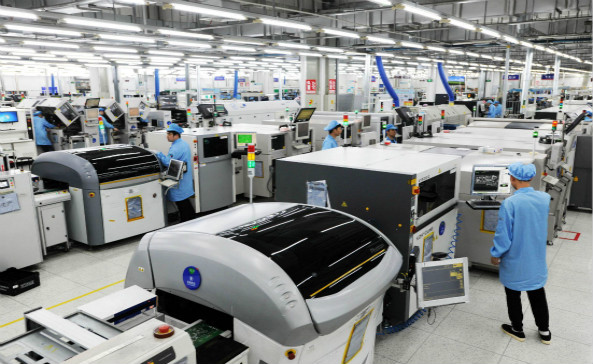
Wintech is a full turnkey service, high-mix, low to mid volume electronics manufacturing and custom material solutions provider with a proven track record of supplying state-of-the-art solutions to all global customer base. They offer tailor made solutions for our customers: high level, high difficult, large size, complex structure, high precision PCB Layout, PCBAs and turnkey complete products.
Whether you need full systems electronic contract manufacturing solutions, prototyping, low to mid volume, or mass production, many of the world's top 500 enterprises have cooperated with Wintech for many years. Wintech is worth relying on.
Our Services Include:
Choosing a service like Wintech effectively outsources the complexity of pc board layout software. Their internal team utilizes high-end EDA tools to ensure your designs are not only electrically correct but also optimized for their specific manufacturing lines. This "Design for Manufacturing" (DFM) approach minimizes errors that often occur when a designer is disconnected from the fabrication process.
3. Autodesk Fusion 360 (formerly EAGLE)
For decades, EAGLE was the go-to software for makers and open-source hardware enthusiasts. Autodesk acquired EAGLE and has since integrated its powerful PCB design capabilities into Fusion 360. This convergence has created a unique platform where electronic design automation (EDA) meets computer-aided design (CAD) and computer-aided manufacturing (CAM) in a single cloud-based environment.
Integration is Key
Fusion 360 stands out for its mechanical integration. If you are designing a wearable device or a product with complex curved housing, Fusion 360 allows you to design the PCB shape directly from the mechanical enclosure geometry. The bidirectional workflow ensures that moving a capacitor on the board automatically updates the 3D model, alerting you to any collisions with the casing.
Licensing and Usability
Fusion 360 operates on a subscription model, which is generally more affordable than enterprise tools like Altium. It retains the vast library of user-contributed components that made EAGLE famous, ensuring you can find footprints for almost any part imaginable. However, long-time EAGLE users may find the new interface and cloud-centric workflow a significant adjustment.
4. KiCad EDA
KiCad has exploded in popularity over the last few years, transitioning from a niche open-source project to a legitimate professional tool. It is the only completely free, open-source option on this list that has no artificial limits on board size, layers, or pin counts. For startups, students, and budget-conscious engineers, KiCad is often the best pc board layout software available.
Community Driven Development
Being open-source, KiCad benefits from a massive community of developers and users. New features are added rapidly, and plugins are available to extend its functionality, such as interactive HTML BOM generation or advanced autorouting. The software includes schematic capture, PCB layout, and a surprisingly capable 3D viewer that supports ray tracing for realistic renderings.
Professional Adoption
While it lacks some of the high-end simulation features found in expensive suites, KiCad is more than capable of designing complex multi-layer boards with high-speed differential pairs. CERN (the European Organization for Nuclear Research) has contributed significantly to its development, adding credibility and advanced features like push-and-shove routing.
5. Cadence OrCAD X
When the design requirements scale up to enterprise levels—think server motherboards or complex aerospace systems—Cadence OrCAD (now evolving into OrCAD X) is a top contender. It shares the same database engine as Cadence Allegro, which is used by the largest electronics companies in the world.
Simulation and Signal Integrity
OrCAD excels in simulation. Its PSpice simulator is legendary for its accuracy in modeling analog and mixed-signal circuits before a single physical prototype is built. For high-speed digital designs, OrCAD offers robust constraint management systems that ensure critical signals meet timing and impedance requirements across the entire board.
Scalability
One of the main selling points of OrCAD is scalability. You can start with a lower-tier license and upgrade as your design needs grow, without having to learn a new tool or migrate data. However, the interface can be viewed as "classic" or dated compared to modern tools like Altium or Fusion 360, and the learning curve is steep.
6. Siemens PADS Professional
Siemens (formerly Mentor Graphics) offers PADS Professional as a mid-market solution that brings high-end Xpedition technology to individual engineers and small teams. It is designed to handle everything from simple IoT devices to complex FPGA-based boards.
Advanced Routing Automation
PADS is famous for its "Sketch Router," a tool that allows designers to draw the intended path of a group of traces, after which the software automatically routes them efficiently. This semi-automated approach saves hours of manual routing time while retaining human control over the general flow. It strikes a balance between manual layout and full autorouting.
Rigid-Flex Capabilities
For modern electronics requiring rigid-flex PCBs (where hard boards are connected by flexible ribbon cables), PADS offers excellent 3D visualization and validation tools. This prevents costly mistakes where flexible sections might tear or fold incorrectly during assembly.
Summary Comparison Table
| Software / Service | Best For | Pricing Model | Key Strength |
|---|---|---|---|
| Altium Designer | Professional Engineers | Subscription (High) | Unified environment & 3D visualization |
| Wintech | Turnkey Manufacturing | Service Quote | Full design-to-production support |
| Fusion 360 | Makers & Mechanical Integration | Subscription (Mid) | MCAD/ECAD integration & Cloud |
| KiCad | Startups & Open Source | Free (Open Source) | No restrictions, active community |
| OrCAD X | Enterprise & Simulation | Subscription/Perpetual | PSpice simulation & scalability |
| PADS Pro | Complex High-Speed Layout | Subscription | Sketch Router & Rigid-Flex |
Frequently Asked Questions (FAQs)
For beginners, KiCad is an excellent choice because it is free and has a massive community producing tutorials. Alternatively, Autodesk Fusion 360 is very user-friendly if you are already familiar with Autodesk products.
Yes, Wintech offers comprehensive PCB Design & Layout services. They can take your project from a simple concept or schematic and handle the entire layout process, ensuring it is optimized for their manufacturing lines.
Absolutely. In 2026, KiCad is used by professional engineering teams at major companies. It supports multi-layer boards, high-speed routing, and differential pairs, making it suitable for most commercial products.
Using a turnkey service eliminates the risk of design errors that cause manufacturing failures. Wintech handles the layout, fabrication, assembly, and sourcing, which streamlines the supply chain and often results in a faster time-to-market for your product.


